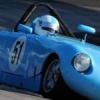
Posté(e) 12 octobre 2015il y a 10 ans comment_110383 Mon ancienne Turner, remise dans sa configuration d'origine (avait couru à Goodwood dans les années 60). A couru à nouveau l'année dernière au Revival dans les mains de son nouveau propriétaire, Darren Turner Dans son ancienne version, course de cote du Marchairuz Signaler
Posté(e) 12 octobre 2015il y a 10 ans comment_110387 Superbe auto, j'avais vu la modif sur un autre forum ça lui donne un look magnifique Signaler
Posté(e) 20 décembre 2018il y a 7 ans comment_124153 Tu en as raté une belle il y a quelques jours https://bringatrailer.com/listing/1962-turner-mk-ii/ Signaler
Posté(e) 20 décembre 2018il y a 7 ans comment_124154 un peu violente pour moi, sinon il y a celle là : https://www.carandclassic.co.uk/car/C1049171 Signaler
Posté(e) 20 décembre 2018il y a 7 ans comment_124161 très affutée, je ne savais que tu l'avais encore. Un album en ligne ? Signaler
Posté(e) 20 décembre 2018il y a 7 ans comment_124164 Ohoh patoune je ne savais pas que c'était monté avec un train avant de midget, suspension type frontline, moteur midget et boite ford type 9. Classe Signaler
Posté(e) 4 janvier 2019il y a 7 ans comment_124267 Le 20/12/2018 à 19:05, patoune a dit : Si... La mienne est à vendre tu fais toujours des kits anglais sur base de Triumph ? Signaler
Posté(e) 2 novembre 2019il y a 6 ans comment_131732 https://www.hagerty.com/articles-videos/articles/2018/11/16/turner-mark-iii-was-race-track-terror Signaler

Join the conversation
You can post now and register later. If you have an account, sign in now to post with your account.