
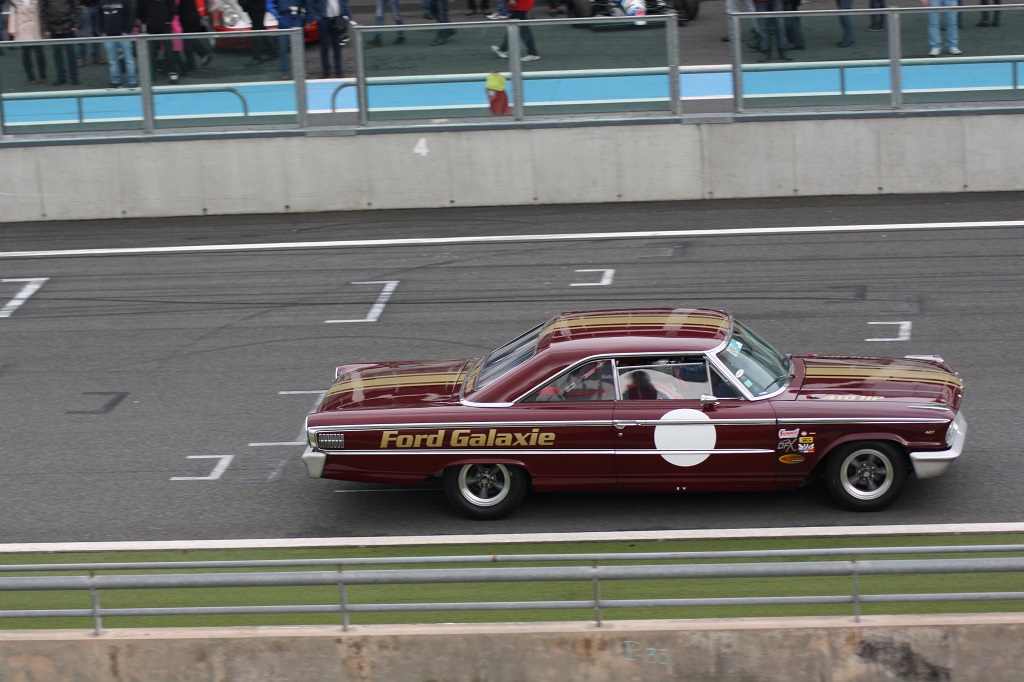

jmcgalaxie
Membres
-
Inscription
-
Dernière visite
Tout ce qui a été posté par jmcgalaxie
-
Quoi tu molis ! la 323 est en sucre ?
-
Bon alors je récapitule les présents, complètez vos emplacements JMC Galaxie Ford Galaxie 5B26 Alpa310 Alpine A 310 Carbone Mini ployester PatRS Ford Escort RS Phil RS BMW 323i fxm911 Ford Escort, Porsche 911, Ford Anglia ( 1 seul pilote ??) autres ?
-
je devrais y être
-
engagement reçu ce jour, je suis en serie "old competition" et l'emplacement 5B26
-
Ouha les boudins, il faut combien de chevaux pour trainer ça ? 9a me rappel les Alfasud du Trophéo des années 80
-
une phot de l'année dernière http://jhbphotos88.fotoloft.fr/debaude-jean-plymouth-barracuda-(2)jpg-pid-415479.html
-
Je ne le connais pas mais il s'agit de Jean Debaude de Vesoul ; tu peux regarder la vidéo faite à course de cote de St Hippolyte que Pat connait bien
-
Super la photo, je me rappelle avoir vu cette Baracuda lorsque j'étais petit à la course de côte des Monts Jura à Salin les Bain. Savez vous que son propriétaire qui habite en Haute Saone l'a ressorti récemment et elle est de nouveau en côte.
-
Dites tout de suite que je suis gros ! Je rappelle que la Galaxie est tombée dans la postion magique quand elle était petite. :D
-
Comme je suis nul en informatique, c'est Pion-Pion qui s'est chargé de la mettre dans mon fichier !
-
C'est bien l'Europe mais à quand l'Amérique ?
-
Un peti nouveau pour les outillages en pouce, j'ai été livré très rapidement pour des douilles 12 pans avec un mot sympa : http://www.bikertools.fr/
-
Trop long à développer, je t'expliquerai de vivie voix la prochaine fois qu'on se verra.
-
:) Shrak tu devais pas avoir une voiture qui lui plaisait !
-
Vous vous souvenez à la dernière sortie de Pouilly, 3 ou 4 ans en arrière, il y avait un type qui s'appelait Charles dans les 55 ans qui avait amené une réplique de cette Mustang. Qu'est il devenu ?
-
Je viens d'acheter des sticker chez :http://deco.stickair.com/autocollants/catalogue.asp?n1=82&n2=710 Vous verrez bientôt la Galaxie avec des peintures de guerre, Il ne sont pas encore collé, le garage est en dessous de zero depuis 3 semaines, mais ça semble de la qualité. Pour les sticker SCCT il m'ne faut 1 pour chaque aile avant. Pour les numéros de porte je préfére la version 1.
-
Où peut on trouver celui là ?
-
Mais avec les bandes à cet endroit c'est plutôt Addidas que Shelby
-
Je suis inscrit sous le SCCT. Par contre je serai là avec le véhicule d'assistance dans dans le parc spécifique. Alex peut on être sûr d'être regroupé aussi dans ce parc et non seulement dans celui d'exposition ?
-
Elle a presque un air de Cheeta avec ses gros pneus qui dépassent
-
Salut Alex, ça coute ?
-
Tu peux y aller, j'en ai un il est parfait très bas pour se glisser et lève suffisament haut. Par contre meme si c'est de l'alu il avoisine les 13kg
-
Super, J'y serai, un espace club sera sympa
-
Bravo Marie-Eves pour cette vidéo.J'ai bien aimé le pickup avec les moteurs de rechange dans la benne. J'ai déjà le pickup... Pour ceux qui aiment je vous conseil le film "Red line 7000" ligne rouge 7000 en français, on y voit plein de Galaxie, Plymouth, Chevrolet en Nascar 63 et 64. Il est facile de le trouver (copie) par très cher sur ebay. Le film "les jours de tonnerre" est en fait le remake de ce film.
-
Géniale la journée, merci aux organisateurs. J'ai rencontré des tas de nouveaux vraiment sympatiques, ça commence à ressembler à une famille ! Dès que j'ai le temps je tente de mettre mes vidéo embarquées.
